REF: MEN-2026-0714
Imaging
SonoStar UProbe C5DC Dual Head Wireless Ultrasound Scanner
Sold & Shipped By
Official Store
Price on Request
Product Code MEN-2026-0714
Condition New
Availability In Stock
Warranty
Sub-Category HandHeld Ultrasounds
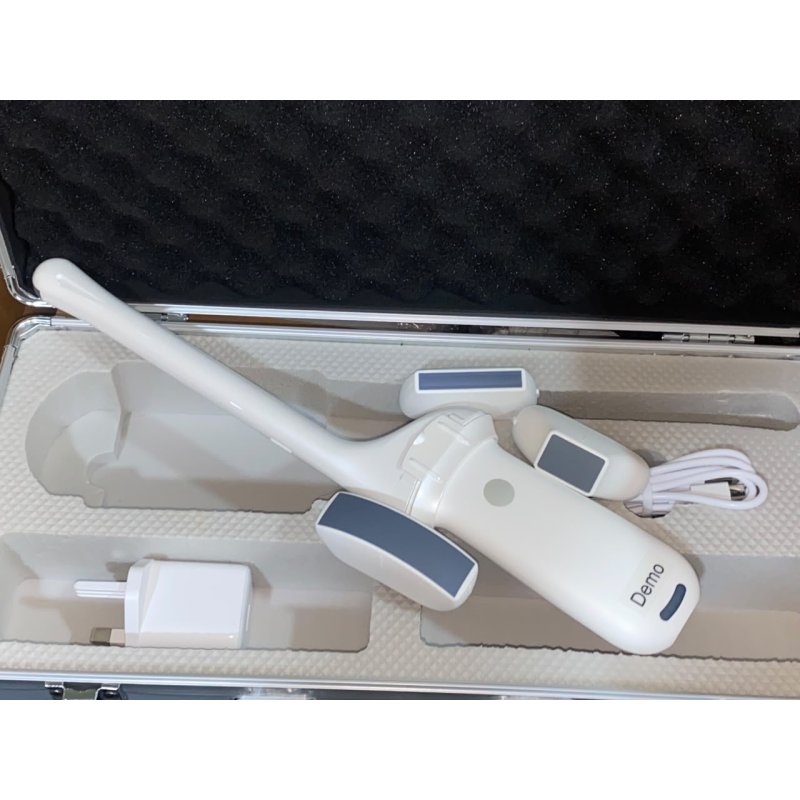
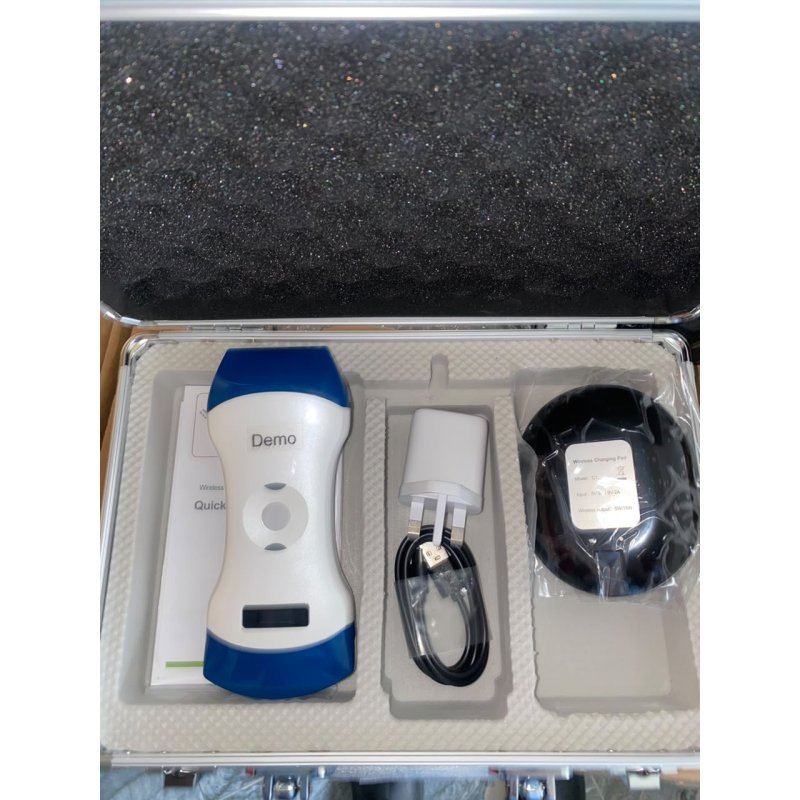
It is a handheld point-of-care medical scanner. It integrates two distinct transducers (typically linear and convex arrays) into a single compact casing, eliminating bulky cables.
1.) Imaging Modes: Supports B-mode, B/M, Color Doppler, PDI, and Pulse Wave (PW) imaging.
2.) Connectivity: Connects wirelessly via its built-in Wi-Fi chip directly to host devices.
3.) Operating Systems: Fully compatible with Apple iOS, Android, and Windows laptops or tablets.
4.) Charging & Power: Charges using the included circular wireless charging pad and operates for roughly 3 hours on a single charge.
2.) Connectivity: Connects wirelessly via its built-in Wi-Fi chip directly to host devices.
3.) Operating Systems: Fully compatible with Apple iOS, Android, and Windows laptops or tablets.
4.) Charging & Power: Charges using the included circular wireless charging pad and operates for roughly 3 hours on a single charge.
1.) Download the App: Search for "WirelessUSG" in the Apple App Store or download the official Android APK file directly from SonoStar Technologies.
2.) Turn On the Probe: Long-press the physical power button on the center of the probe to activate it.
3.) Change Transducer Heads: For dual-head probes, pressing and holding the power button for approximately 3 seconds switches the internal processing from one transducer head (e.g., Convex for abdominal scans) to the other (e.g., Linear for vascular/superficial scans).
4.) Establish Wi-Fi Link: Open your smartphone or tablet's Wi-Fi settings. Find the SSID matching the probe's serial number (often starting with "SS" or "SL"). Enter the password, which defaults to the unit's unique serial number located on the charging port label.
5.) Freeze/Thaw: A quick single press on the power button while in the app toggles the real-time scanning feed between live view and frozen image mode.
2.) Turn On the Probe: Long-press the physical power button on the center of the probe to activate it.
3.) Change Transducer Heads: For dual-head probes, pressing and holding the power button for approximately 3 seconds switches the internal processing from one transducer head (e.g., Convex for abdominal scans) to the other (e.g., Linear for vascular/superficial scans).
4.) Establish Wi-Fi Link: Open your smartphone or tablet's Wi-Fi settings. Find the SSID matching the probe's serial number (often starting with "SS" or "SL"). Enter the password, which defaults to the unit's unique serial number located on the charging port label.
5.) Freeze/Thaw: A quick single press on the power button while in the app toggles the real-time scanning feed between live view and frozen image mode.